
For desk adjusters and carrier staff adjusters
Every desk file reviewed, reserved and moving.
For desk adjusters and supervisors at adjusting firms, and staff adjusters at insurance carriers. Each adjuster works their own files, and supervisors see every claim and assign or reassign it in one click.
Pricing on request · from 1 user · supervisors count as users
Best uses
What desk teams use it for
Initial file review in minutes
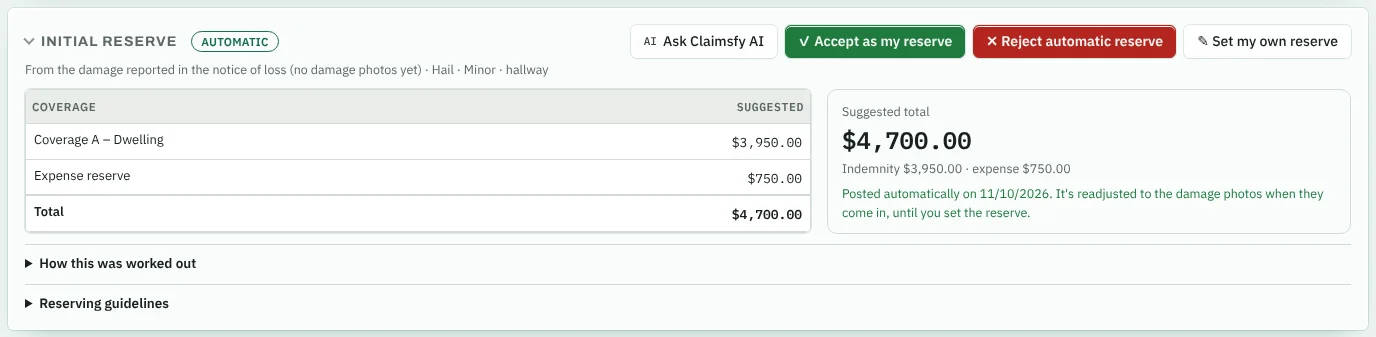
A first-review note with suggested reserves and possible coverage concerns, ready for your edits.
File reviewReserves, payments and authority
Reserve suggestions from day one, payment requests, and approval limits for each adjuster.
Supplement review
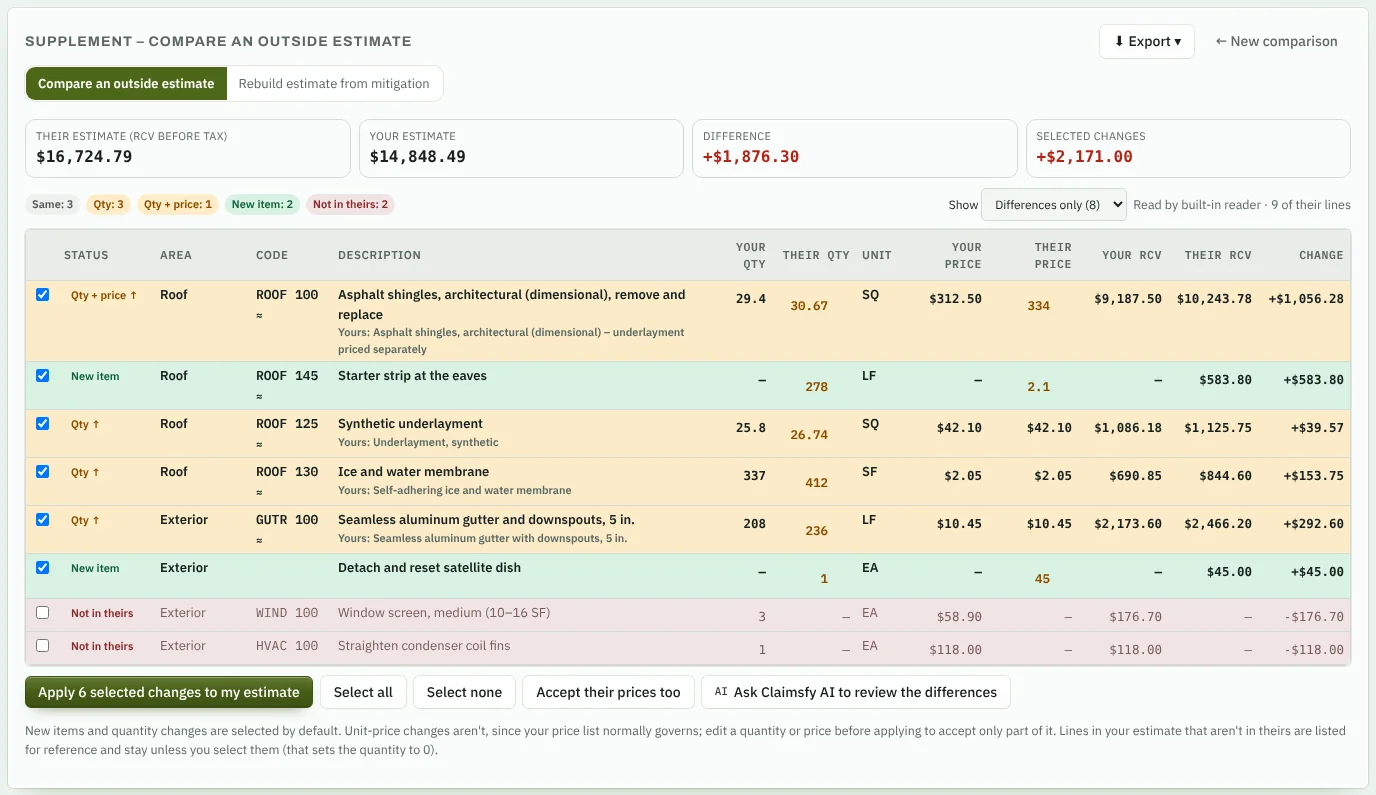
Compare a contractor, public adjuster or attorney estimate with yours and apply only what you accept.
Supplement reviewNotes in each adjuster's words
Each adjuster keeps their own templates and can save any note as one. Write with AI fills in the template from the claim file. Notes collapse to one line each, so long files are quick to scroll.
Notes and lettersField Estimate Review
Check the field adjuster's estimate against the carrier's guidelines, or standard practice when there are none. Decide each finding, then approve it or return it with corrections. Mitigation invoices are reviewed against the S500 water damage standard.
Client portal included
Turn it on so carrier and TPA clients follow their claims, get reports and approve authority.
Client portalDispatch and inspection
Send it to any firm. See everything come back.
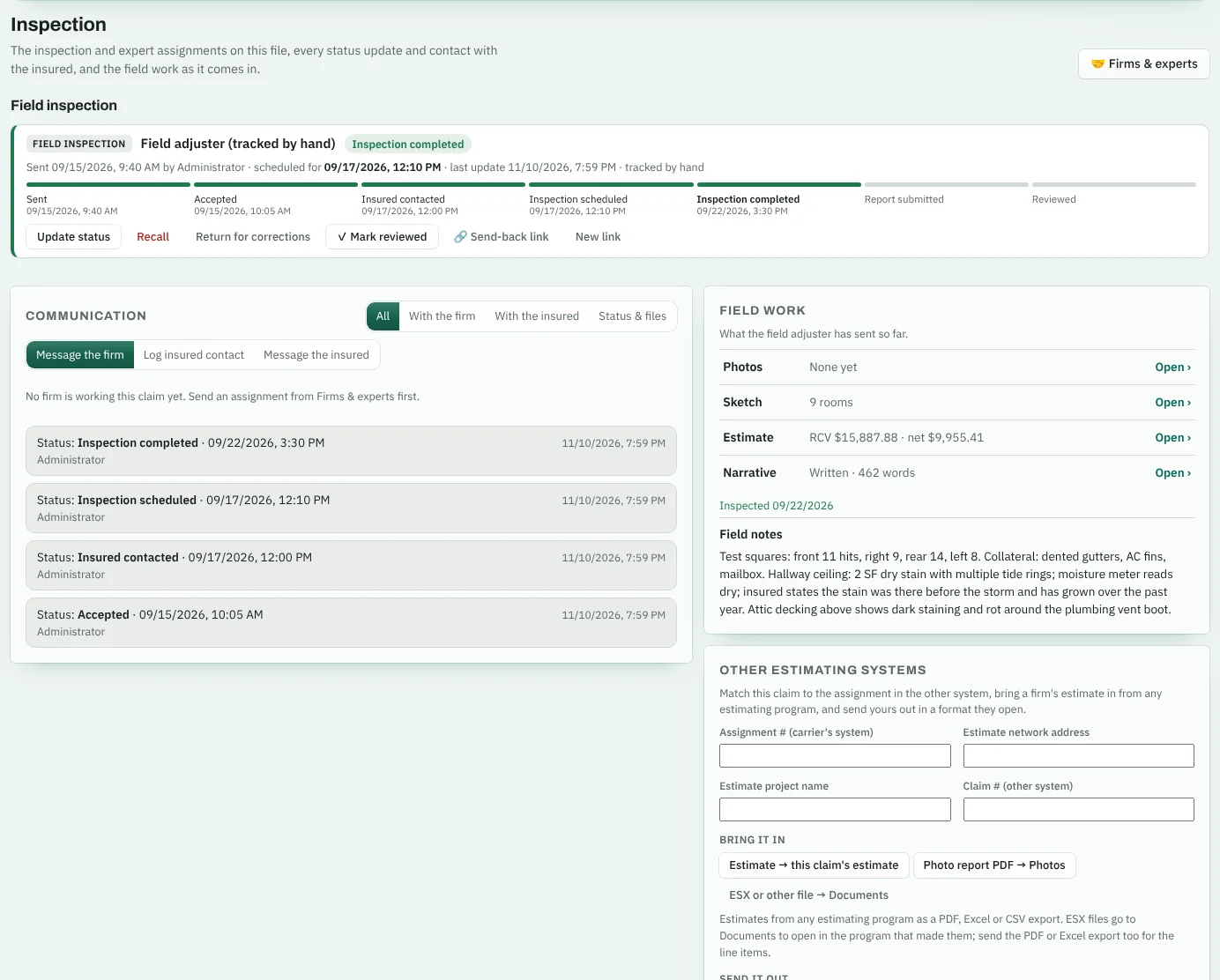
Dispatch a claim to an adjusting firm or an expert, and follow the inspection on one tab: status, every contact with the insured, and the field work as it arrives.
- Any firm, any expert: field adjusting firms, engineers, mitigation, mold remediation, lightning strike specialists, contents specialists, appraisers and building consultants. Add a new firm while you send.
- A vendor portal for every firm. They sign in to see only the assignments you sent them, update status, log calls with the insured, upload photos and reports, and message the desk.
- Firms in Claimsfy Field accept or reject each assignment there, with a reason when they reject it, and their status updates come back on their own.
- Status at a glance, or enter it yourself: sent, accepted, insured contacted, scheduled, inspected, report in, reviewed, each with its date.
- One communication timeline between the desk, the firm and the insured. The insured replies through a secure link, no account needed.
- Photos, sketch, estimate and narrative live under the Inspection tab, so the field work is in one place.
- Works with the software your firms already use. A send-back link takes the inspection from any software, no account needed. Bring estimates in as PDF, Excel or CSV, and send an entry sheet, a CSV or the status summary back out.
Supplement review
Settle supplements in one sitting
- Their total, yours and the difference at the top of the page.
- Every change marked: quantity, price, new items and items they left out.
- Accept part of a line by editing the quantity before you apply it.
- A comparison report to send with your decision.
QA review
Check the whole file before it goes out
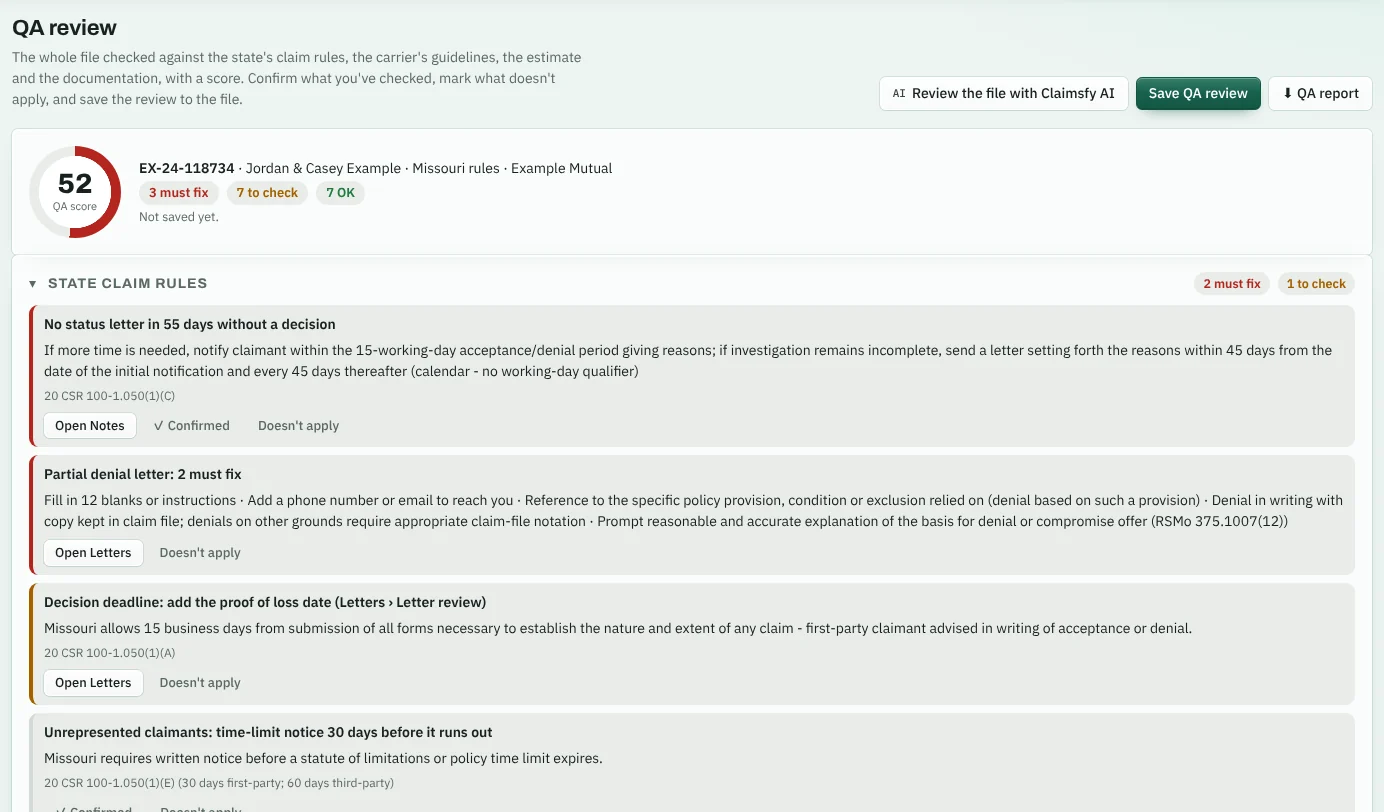
The QA review tab scores the claim file against the claim rules of the state where the loss is, the carrier's guidelines, the estimate and the documentation.
- State deadlines from the dates in the file: acknowledgment, decision, payment and status letters, with the statute cited.
- Every letter on the file run through the letter review for the Department of Insurance notices and what it must say.
- Carrier guidelines, reserves and documentation: the estimate score, reserves against the estimate, coverage, photos, notes and the mortgagee.
- Confirm or mark doesn't apply, review it with Claimsfy AI, and save it to the file with a QA report.
For supervisors
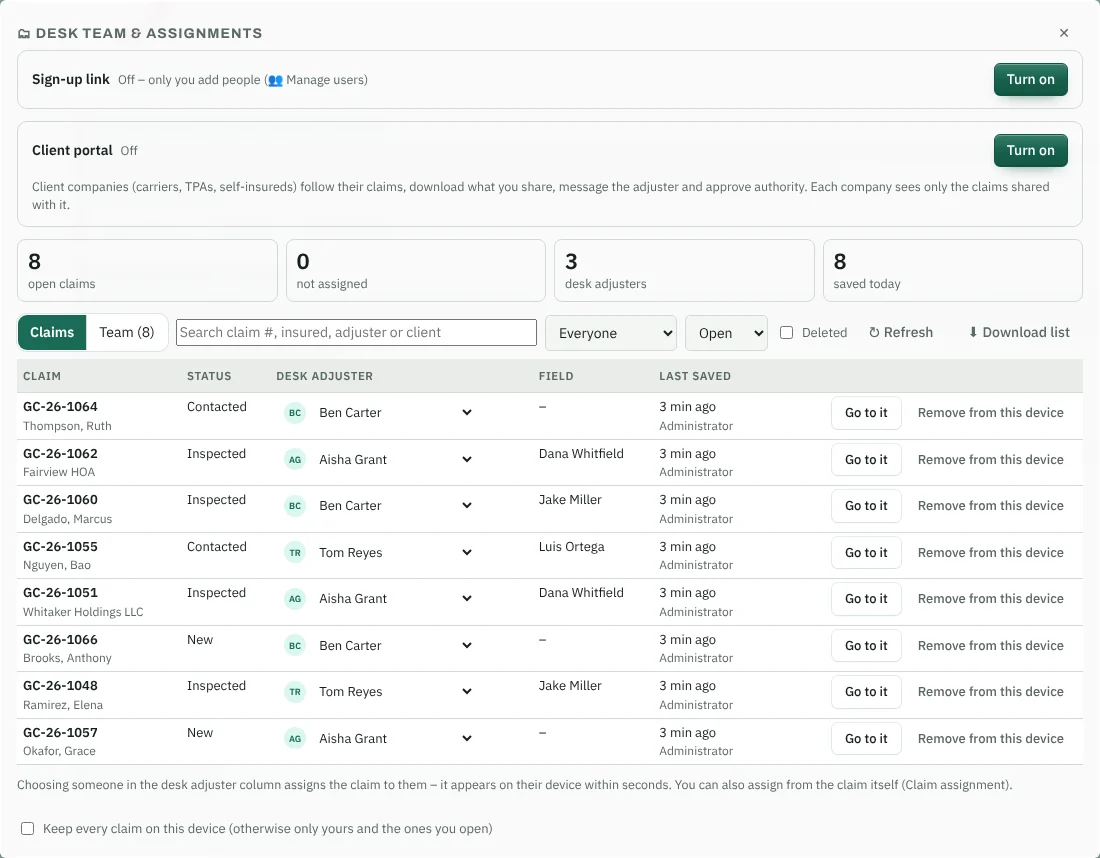
The whole desk on one screen
- Every open claim with its status, desk adjuster and field adjuster.
- Assign or reassign from the list. The claim moves to the new adjuster in seconds.
- Find unassigned work with one filter.
- Export the workload for your weekly review.
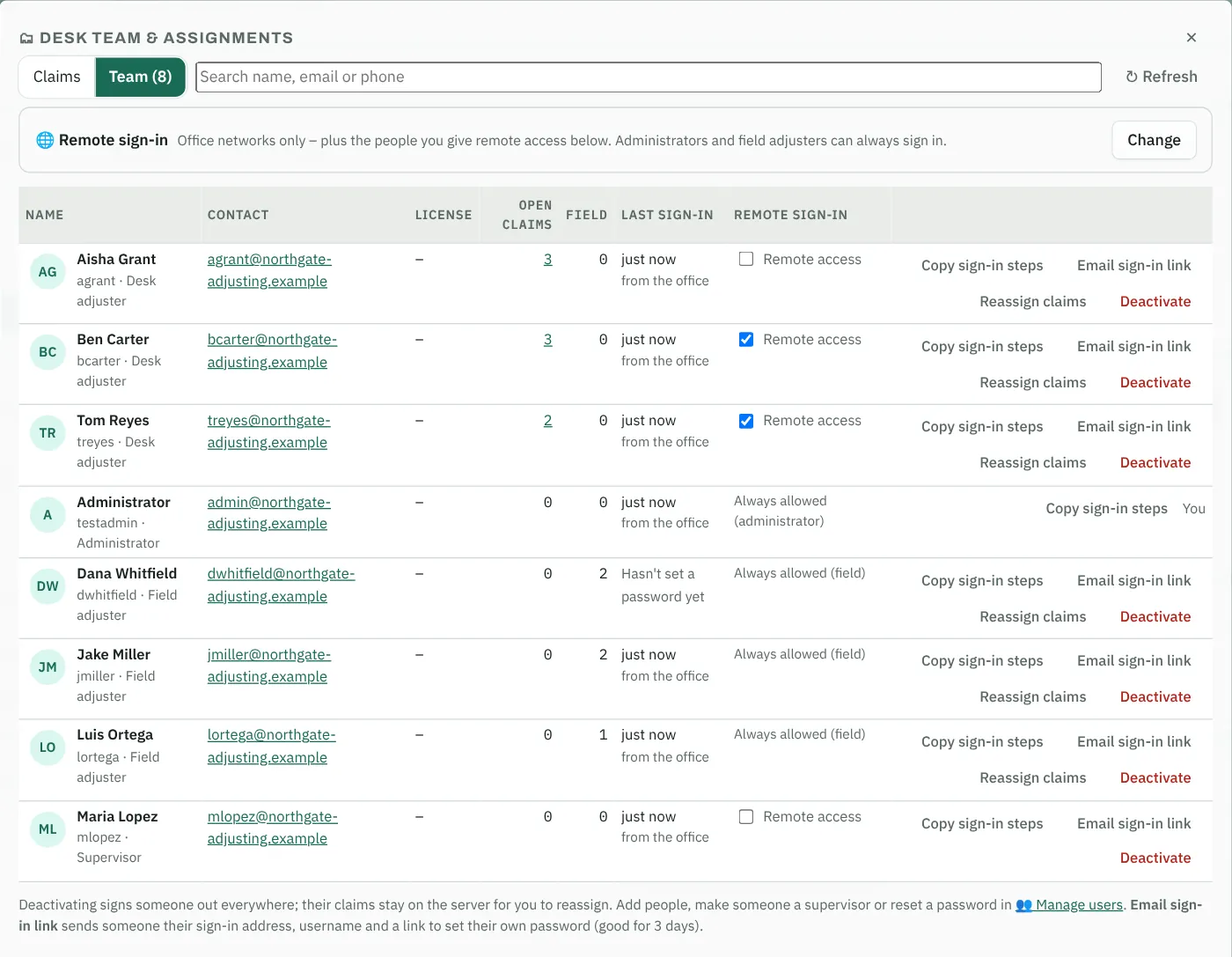
Remote sign-in
Work the desk from anywhere
Each desk adjuster signs in at your Claimsfy address with their own username and password, from the office, home or the road.
- Enroll each adjuster in one click. Email sign-in link sends their address, username and a link to set their own password. No passwords in email.
- Any computer, tablet or phone with a modern browser. Install it like an app in one tap.
- Office-only if you need it. Limit sign-in to your office networks and give remote access to the people you choose.
- See where people sign in from: the office or outside it, with every sign-in in the usage history.
Storage and backups
Every file on every claim, with room to spare
Unlimited storage is included. There's no cap on claims, photos or documents and no charge per gigabyte, so nothing gets deleted to make room.
Full photo sets and reports
Keep every inspection photo, field adjuster estimate, engineer report, invoice and letter in the claim file, on every claim your desk handles.
Closed files stay complete
Closed claims keep their notes, documents and history for as long as you subscribe. Reopen one for a supplement and everything is still there.
Backed up every night
Each night the whole workspace is copied to separate, encrypted storage. Every night's copy is kept for 90 days, and the copy from the 1st of each month for 7 years.
Built for desk teams
Tell us about your team in a short questionnaire, and we reply within one business day with pricing and next steps. Setup and data migration are done with the Claimsfy team.
Supervisors count as users. Start with one user. Client portal users are free and unlimited.
Want it set up your way? Desk setup package $1,250. Customization prices
Request pricingWhat's included
- Remote sign-in for every desk adjuster
- Supervisors assign and reassign every claim
- Activities on every file with priorities, supervisor assignment and pending actions
- Dispatch to firms and experts, a vendor portal and the Inspection tab
- Initial file review, reserves and coverage concerns
- Supplement review and Field Estimate Review
- QA review of the whole file, with a score
- Payments and authority limits
- Personal note templates and letters
- Letter review against the claim letter rules of all 50 states and DC
- Supervisor approval for letters with policy language, then mailing with tracking
- Client portal with unlimited client users
- Two-step sign-in for every account
- Unlimited storage, backed up every night
- AI, hosting, updates and email support